Title: DOOM — At Doom's Gate (E1M1)
On April 29, 2026, a Linux kernel vulnerability called CopyFail (CVE-2026-31431) was publicly disclosed. The headline is a banger: any unprivileged local user can become root on virtually every mainstream Linux distribution running a kernel built since 2017. No race conditions, no timing tricks — just a 732-byte script and a few seconds.
I wanted to understand it, so I set up a Debian 12 VM on UTM/macOS (ARM64), reproduced the issue, tested whether a standard apt update && apt upgrade actually fixed it, and created a mitigation script that works across every major distro. Here's what I found, r0ckstar...
What Is CopyFail?
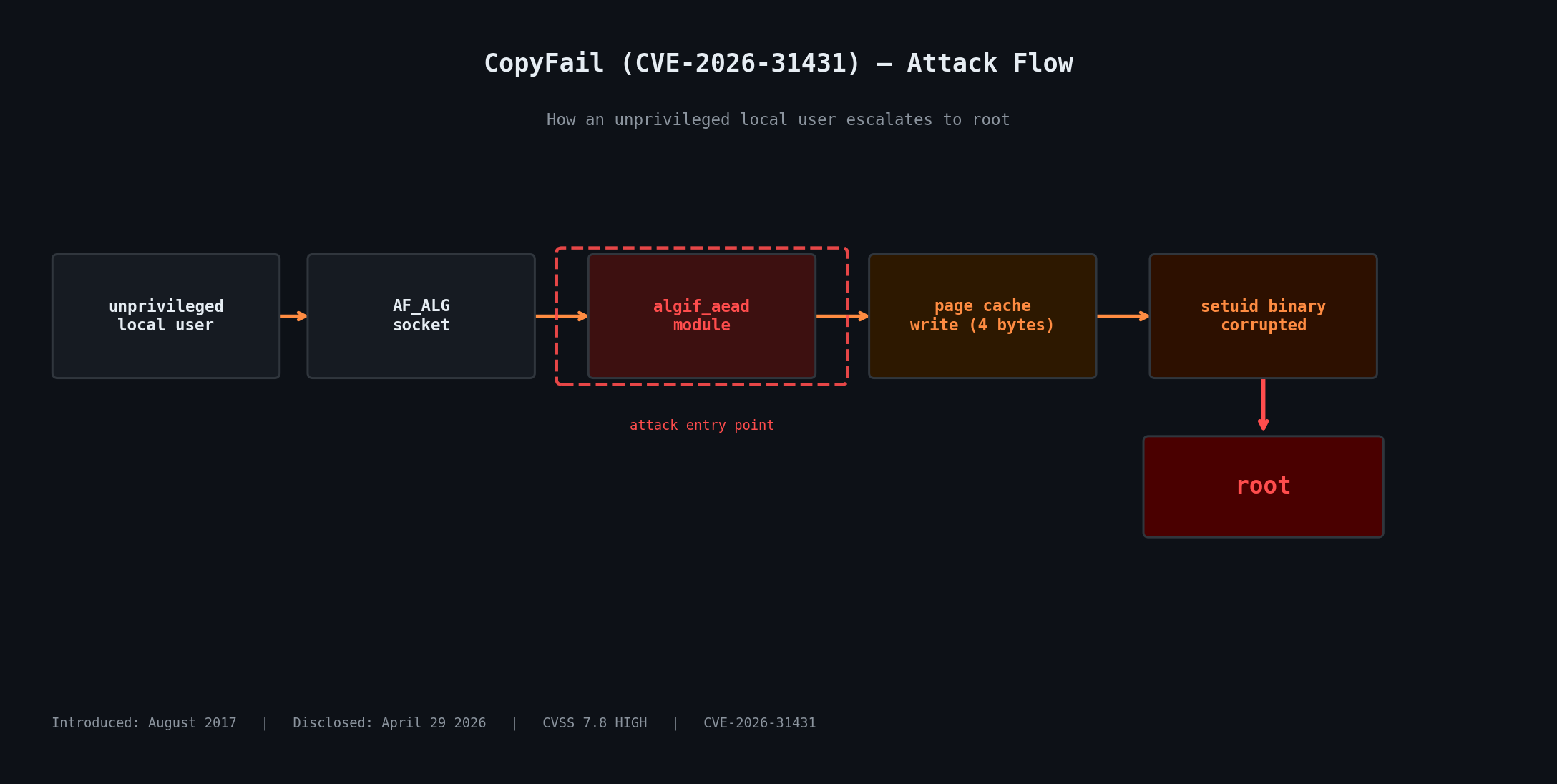
CopyFail is a logic bug in the Linux kernel's cryptographic subsystem — specifically in the algif_aead kernel module, which exposes AEAD (Authenticated Encryption with Associated Data) cipher operations via the AF_ALG socket interface. The bug was introduced in August 2017 and has been sitting in virtually every Linux kernel built since - can you fecking believe it?!
The flaw allows any user to trigger a controlled 4-byte write into the kernel's page cache — shared memory that backs files on disk. An attacker can aim that write at a setuid binary like /usr/bin/su or /usr/bin/sudo, corrupt it in memory, and the next time it runs, it runs as root — for them.
The page cache is shared across all processes on a system, which means this vulnerability also has cross-container implications in multi-tenant environments. A single unprivileged user in one container could potentially affect processes in others on the same host.
CVSS score: 7.8 (High)
Affected: All mainstream Linux distros running kernels built from August 2017 onward, until patched
Remotely exploitable: No — requires local unprivileged access
Official disclosure: copy.fail by Theori / Xint
My Test: Debian 12 ARM64 on UTM
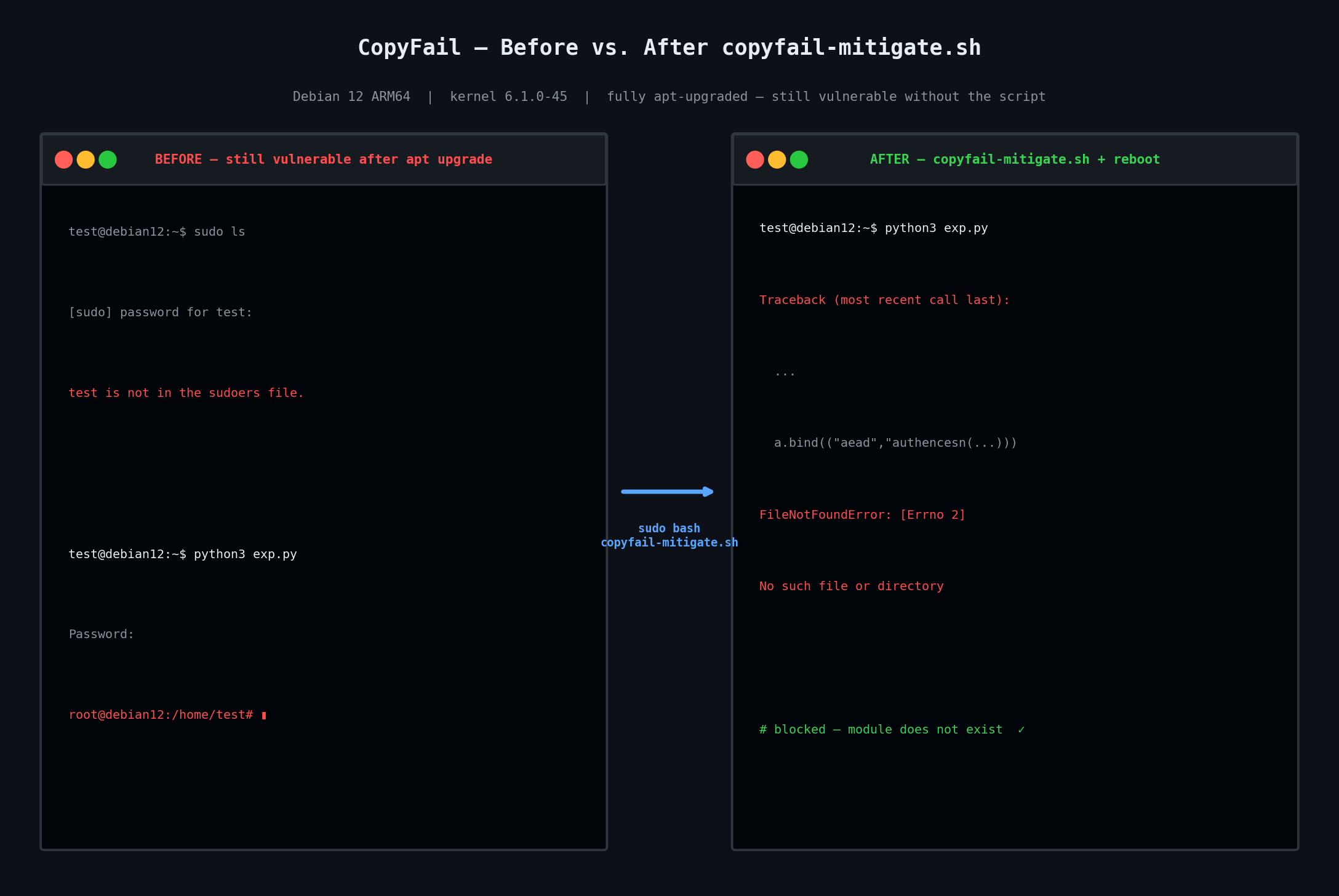
I ran this on a Debian 12 (Bookworm) VM running on Apple Silicon via UTM. The kernel was 6.1.0-44-arm64. From a standard unprivileged user account with no sudo access:
$ sudo ls
[sudo] password for test:
test is not in the sudoers file.

$ python3 copy_fail_exp.py
Password:
root@debian12:/home/test#
That is it. Local user to root in under five seconds flat!!
Does apt update fix it?
This is where it gets f00king wild. I ran a full apt update && apt upgrade, then rebooted into the newly installed kernel — 6.1.0-45-arm64. Ran the exploit again:
root@debian12:/home/test#Still vulnerable. Debian's kernel update to 6.1.0-45 on ARM64 does not contain the CopyFail fix as of May 3, 2026. Updating and rebooting is not enough on this platform right now, sucka!!
You can check whether a patched kernel is available for your Debian architecture with:
apt-cache policy linux-image-arm64 # or linux-image-amd64 on x86If "Installed" and "Candidate" show the same version, there is nothing to upgrade to yet. Track patch availability at the Debian Security Tracker.
The Mitigation: Blacklisting algif_aead
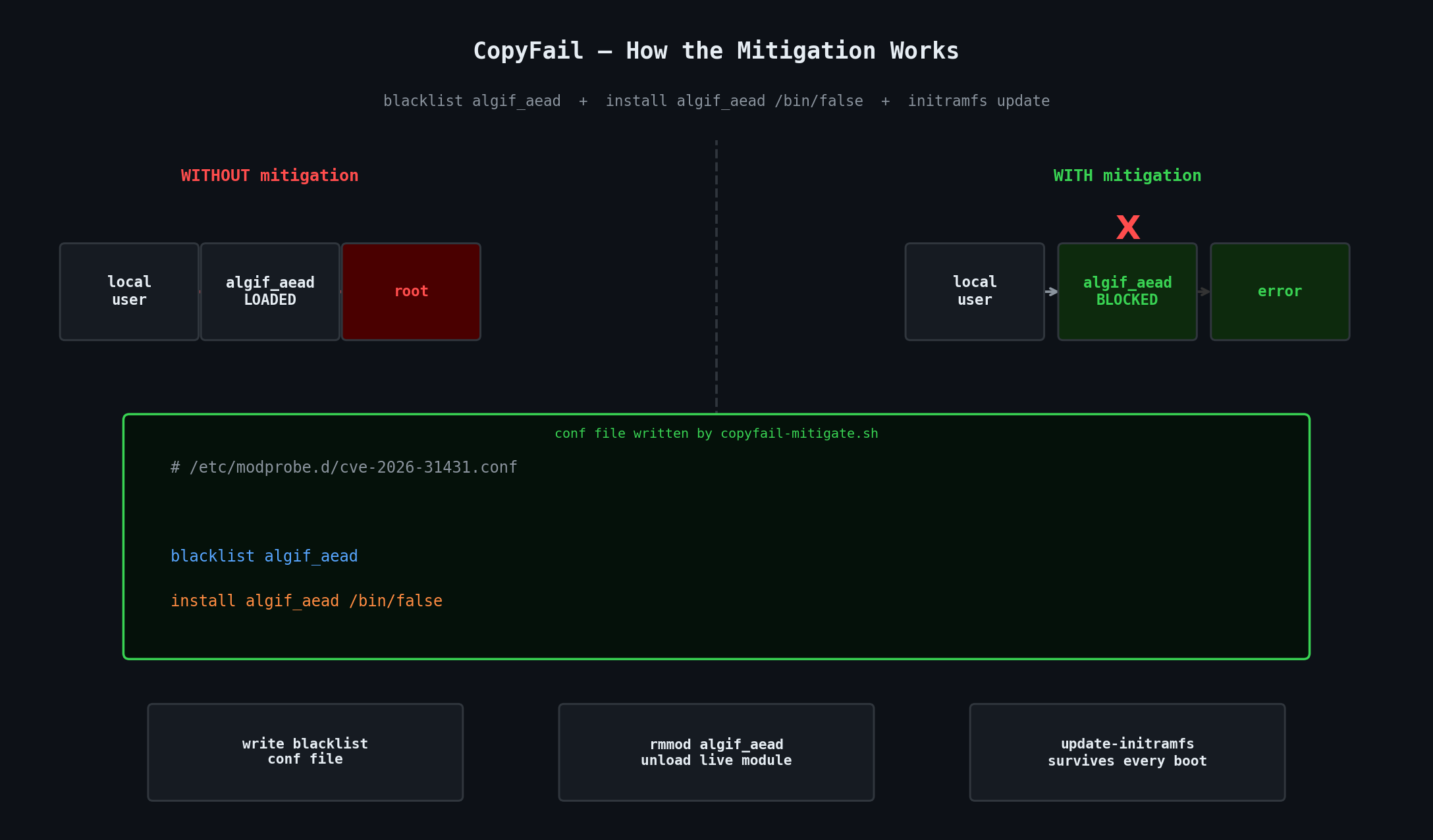
The entire attack flows through the algif_aead kernel module. No module, no attack path. The fix — until a patched kernel lands in your repo — is to blacklist it.
A basic one-liner does the job:
printf "blacklist algif_aead\ninstall algif_aead /bin/false\n" \
  | sudo tee /etc/modprobe.d/cve-2026-31431.conf
sudo rmmod algif_aead 2>/dev/null || true
The two lines do slightly different things. blacklist algif_aead tells the module loader never to load it automatically. install algif_aead /bin/false is the more robust of the two — it means even a direct modprobe algif_aead call gets redirected to /bin/false, which immediately exits with failure. The blacklist alone can be bypassed; the install override cannot.
The rmmod line evicts the module from the currently running kernel so you are protected right now, not just after the next reboot.
But there is a small catch: you also need to regenerate your initramfs. Without that step, the blacklist file exists on disk but the module could sneak in during early boot before userspace reads modprobe config. On Debian/Ubuntu that means running sudo update-initramfs -u -k all after writing the conf file.
After applying the mitigation
$ python3 copy_fail_exp.py
Traceback (most recent call last):
  ...
  a.bind(("aead","authencesn(hmac(sha256),cbc(aes))"))
FileNotFoundError: [Errno 2] No such file or directory
The exploit dies immediately at the socket bind call. The AEAD kernel interface is gone. Nothing to attach to, nothing to corrupt - B00M!
The Full Cross-Distro Mitigation Script
I created a script that handles detection, blacklisting, module unloading, and initramfs regeneration automatically — and gives you the right kernel update command for your specific distro and architecture. It covers Debian, Ubuntu, Linux Mint, Kali, Arch and all Arch-based distros, Fedora, RHEL/AlmaLinux/Rocky, and openSUSE/SLES.
Run it with: sudo bash copyfail-mitigate.sh
#!/usr/bin/env bash
# =============================================================================
#  CopyFail (CVE-2026-31431) — Detection & Mitigation Script
#  Covers: Debian, Ubuntu, Linux Mint, Arch (+ Manjaro/EndeavourOS), Fedora,
#          RHEL / AlmaLinux / Rocky Linux, openSUSE / SLES
#
#  What this does:
#    1. Detects your distro and running kernel
#    2. Checks whether the vulnerable algif_aead module is present / loaded
#    3. Checks whether a blacklist mitigation already exists
#    4. Writes a modprobe blacklist if needed and unloads the live module
#    5. Regenerates initramfs so the blacklist survives every future boot
#    6. Tells you the exact command to pull a patched kernel for your distro
#
#  Usage:  sudo bash copyfail-mitigate.sh
# =============================================================================

set -euo pipefail

RED='\033[0;31m'
YELLOW='\033[1;33m'
GREEN='\033[0;32m'
CYAN='\033[0;36m'
BOLD='\033[1m'
NC='\033[0m'

CVE="CVE-2026-31431"
MODULE="algif_aead"
CONF_FILE="/etc/modprobe.d/cve-2026-31431.conf"

info()   { echo -e "${CYAN}[INFO]${NC}  $*"; }
ok()     { echo -e "${GREEN}[ OK ]${NC}  $*"; }
warn()   { echo -e "${YELLOW}[WARN]${NC}  $*"; }
bad()    { echo -e "${RED}[VULN]${NC}  $*"; }
hdr()    { echo -e "\n${BOLD}$*${NC}"; }
banner() {
    echo ""
    echo -e "${BOLD}============================================================${NC}"
    echo -e "${BOLD}  $*${NC}"
    echo -e "${BOLD}============================================================${NC}"
}

if [[ $EUID -ne 0 ]]; then
    echo -e "${RED}[ERROR]${NC} This script must be run as root."
    echo        "        Try:  sudo bash $0"
    exit 1
fi

banner "CopyFail (${CVE}) — Detection & Mitigation"

hdr "[ 1 / 4 ]  Detecting system..."

DISTRO_ID=""
DISTRO_NAME="Unknown"
DISTRO_VERSION=""

if [[ -f /etc/os-release ]]; then
    source /etc/os-release
    DISTRO_ID="${ID:-unknown}"
    DISTRO_NAME="${NAME:-Unknown}"
    DISTRO_VERSION="${VERSION_ID:-rolling}"
fi

KERNEL=$(uname -r)
ARCH=$(uname -m)

case "${ARCH}" in
    x86_64)  DEB_KERNEL_PKG="linux-image-amd64" ;;
    aarch64) DEB_KERNEL_PKG="linux-image-arm64" ;;
    armv7l)  DEB_KERNEL_PKG="linux-image-armmp" ;;
    i686)    DEB_KERNEL_PKG="linux-image-686"   ;;
    *)       DEB_KERNEL_PKG="linux-image-$(dpkg --print-architecture 2>/dev/null || echo "${ARCH}")" ;;
esac

info "Distribution : ${DISTRO_NAME} ${DISTRO_VERSION}"
info "Kernel       : ${KERNEL}"
info "Architecture : ${ARCH}"

hdr "[ 2 / 4 ]  Checking for vulnerable module '${MODULE}'..."

MODULE_EXISTS=false
MODULE_LOADED=false

if modinfo "${MODULE}" &>/dev/null; then
    MODULE_EXISTS=true
    bad "Module '${MODULE}' is present in this kernel build."
else
    ok  "Module '${MODULE}' does not exist in this kernel — likely already patched."
fi

if lsmod | grep -q "^${MODULE}"; then
    MODULE_LOADED=true
    bad "Module '${MODULE}' is currently LOADED. Active exploitation is possible right now."
else
    info "Module is not currently loaded in memory."
fi

hdr "[ 3 / 4 ]  Checking for existing blacklist mitigation..."

ALREADY_MITIGATED=false

if grep -qs "${MODULE}" /etc/modprobe.d/*.conf 2>/dev/null; then
    ALREADY_MITIGATED=true
    ok  "Blacklist entry already present in /etc/modprobe.d/ — no duplicate write needed."
fi

hdr "[ 4 / 4 ]  Applying mitigation..."

if [[ "${MODULE_EXISTS}" == false ]]; then
    ok  "Module not present — mitigation file not required, skipping."
else
    if [[ "${ALREADY_MITIGATED}" == true ]]; then
        ok  "Mitigation already in place — skipping write."
    else
        printf "# CopyFail (CVE-2026-31431) mitigation — added %s\n" "$(date -u +%Y-%m-%dT%H:%M:%SZ)" > "${CONF_FILE}"
        printf "blacklist %s\n" "${MODULE}"                                                              >> "${CONF_FILE}"
        printf "install %s /bin/false\n" "${MODULE}"                                                    >> "${CONF_FILE}"
        ok  "Written: ${CONF_FILE}"
    fi

    if [[ "${MODULE_LOADED}" == true ]]; then
        if rmmod "${MODULE}" 2>/dev/null; then
            ok  "Module successfully unloaded from the running kernel."
        else
            warn "Could not unload module (may be in use). A reboot will fully apply the mitigation."
        fi
    else
        ok  "Module was not loaded — blacklist takes effect immediately for any future load attempt."
    fi

    hdr "Updating initramfs / module config..."

    case "${DISTRO_ID}" in
        ubuntu|debian|linuxmint|pop|neon|kali)
            if command -v update-initramfs &>/dev/null; then
                update-initramfs -u -k all && ok "initramfs updated (Debian/Ubuntu family)."
            else
                warn "update-initramfs not found — please run it manually."
            fi
            ;;
        fedora|rhel|centos|almalinux|rocky|ol|scientific)
            if command -v dracut &>/dev/null; then
                dracut --force && ok "initramfs updated via dracut (Fedora/RHEL family)."
            else
                warn "dracut not found — please regenerate initramfs manually."
            fi
            ;;
        arch|manjaro|endeavouros|garuda|artix)
            if command -v mkinitcpio &>/dev/null; then
                mkinitcpio -P && ok "initramfs updated via mkinitcpio (Arch family)."
            else
                warn "mkinitcpio not found — please regenerate initramfs manually."
            fi
            ;;
        opensuse*|sles|suse)
            if command -v dracut &>/dev/null; then
                dracut --force && ok "initramfs updated via dracut (openSUSE/SLES)."
            else
                warn "dracut not found — please regenerate initramfs manually."
            fi
            ;;
        *)
            warn "Distro '${DISTRO_ID}' not recognised — please regenerate your initramfs manually."
            ;;
    esac
fi

banner "How to get the patched kernel for your distro"

case "${DISTRO_ID}" in
    ubuntu|pop|neon)
        echo ""
        info "Run these commands to install the patched Ubuntu kernel:"
        echo ""
        echo "    sudo apt update && sudo apt full-upgrade -y"
        echo "    sudo reboot"
        echo ""
        case "${DISTRO_VERSION}" in
            26.04) ok  "Ubuntu 26.04 (Resolute) ships an unaffected kernel — update and you're clean." ;;
            24.04) warn "Ubuntu 24.04 LTS: patched kernel available via apt — run the above." ;;
            22.04) warn "Ubuntu 22.04 LTS: check that linux-image is updated via apt." ;;
            *)     warn "Version ${DISTRO_VERSION}: check https://ubuntu.com/security/CVE-2026-31431" ;;
        esac
        ;;
    debian)
        echo ""
        info "To update your Debian kernel, run:"
        echo ""
        echo "    sudo apt update && sudo apt upgrade -y ${DEB_KERNEL_PKG}"
        echo "    sudo reboot"
        echo ""
        warn "NOTE: As of May 2026, the patched kernel may not yet be available for all"
        warn "architectures (confirmed absent on arm64 as of 2026-05-03). If the above"
        warn "command shows nothing to upgrade, the blacklist mitigation above is your"
        warn "only protection until the fix lands in your repo."
        info "Track patch availability: https://security-tracker.debian.org/tracker/CVE-2026-31431"
        ;;
    linuxmint)
        echo ""
        info "Linux Mint is Ubuntu-based. Use Update Manager or run:"
        echo ""
        echo "    sudo apt update && sudo apt full-upgrade -y && sudo reboot"
        ;;
    kali)
        echo ""
        info "Kali Linux (Debian-based). Run:"
        echo ""
        echo "    sudo apt update && sudo apt full-upgrade -y && sudo reboot"
        ;;
    arch|manjaro|endeavouros|garuda|artix)
        echo ""
        info "Arch is a rolling release — a full system update pulls the patched kernel:"
        echo ""
        echo "    sudo pacman -Syu"
        echo "    sudo reboot"
        echo ""
        ok  "After 'pacman -Syu', your kernel should include the upstream fix."
        ;;
    fedora)
        echo ""
        info "Fedora — update just the kernel and reboot:"
        echo ""
        echo "    sudo dnf update --refresh -y kernel && sudo reboot"
        ;;
    rhel|centos|almalinux|rocky|ol|scientific)
        echo ""
        warn "RHEL / AlmaLinux / Rocky: vendor patches were still rolling out as of May 2026."
        echo ""
        echo "    sudo dnf update -y kernel && sudo reboot"
        echo ""
        info "Monitor your vendor advisory for the confirmed patched kernel version."
        info "AlmaLinux advisory: https://almalinux.org/blog/2026-05-01-cve-2026-31431/"
        ;;
    opensuse*|sles|suse)
        echo ""
        info "openSUSE / SLES — update and reboot:"
        echo ""
        echo "    sudo zypper refresh && sudo zypper update -t pattern base kernel-default"
        echo "    sudo reboot"
        ;;
    *)
        echo ""
        warn "Distro '${DISTRO_ID}' not in known list."
        info "Update your kernel via your package manager, then reboot."
        info "The blacklist above remains active as a safety net until then."
        ;;
esac

banner "Summary"
echo ""

if [[ "${MODULE_EXISTS}" == false ]]; then
    ok  "This kernel does not include '${MODULE}'."
    ok  "You are likely already running a patched or unaffected kernel."
else
    ok  "Blacklist mitigation : APPLIED  (${CONF_FILE})"
    if [[ "${MODULE_LOADED}" == true ]]; then
        warn "REBOOT RECOMMENDED — the module was live when this script ran."
        warn "Until you reboot, the mitigation may not be fully in effect."
    else
        ok  "Module was not loaded — you are protected as of right now."
    fi
    echo ""
    info "For permanent protection: pull the patched kernel (commands above) and reboot."
fi

echo ""
info "More info  :  https://copy.fail/"
info "NVD entry  :  https://nvd.nist.gov/vuln/detail/${CVE}"
info "Ubuntu fix :  https://ubuntu.com/blog/copy-fail-vulnerability-fixes-available"
echo ""
What the Script Does, Step by Step
Step 1 — Detects your system. Reads /etc/os-release to identify your distro and version. Also detects your CPU architecture so it resolves the correct kernel package name for Debian/Ubuntu (e.g. linux-image-arm64 on ARM, not the wrong linux-image-amd64).
Step 2 — Checks module state. Runs modinfo algif_aead to see whether the module exists in your kernel build at all. If it does not exist, you are likely on a patched kernel already. Then checks lsmod to see whether it is currently loaded and running in memory.
Step 3 — Checks for existing mitigation. Scans /etc/modprobe.d/ to see whether a blacklist entry already exists. Idempotent — safe to run multiple times.
Step 4 — Applies the blacklist. Writes the conf file, calls rmmod to evict the live module if it is loaded, then regenerates initramfs using the right tool for your distro (update-initramfs, dracut, or mkinitcpio) so the blacklist survives every future boot.
Finally — it prints the exact package manager command to install your distro's patched kernel once it is available, with an honest warning if it has not landed in your repo yet.
Quick Check Without the Script
If you just wanna know whether a given machine is potentially vulnerable right now, run:
modinfo algif_aead 2>&1If it returns module information, the module exists in your kernel and the vulnerability is present. If it returns "not found", you are either on a patched kernel or one compiled without that module. Either way you are not exposed.
What About Systems That Need algif_aead?
The blacklist trades away any software that legitimately uses algif_aead for AEAD cipher operations via the kernel crypto API. This is uncommon on desktop systems but could affect certain VPN software or specialised crypto tooling. If you have something that depends on it, the right alternative is AppArmor. Debian 12 ships with AppArmor enabled, and a deny rule for network afalg in the relevant profile will block the exploit path without removing the module. The permanent fix — once your distro ships it — is a patched kernel, at which point the module is safe to load again and you can remove the conf file.
Patch Status by Distro (as of May 3, 2026)
The upstream kernel fix landed in mainline on April 1, 2026 (commit a664bf3d603d). Vendor rollout is uneven:
Debian 12 arm64: Not yet patched as of my testing. Blacklist mitigation is your only option right now.
Ubuntu 24.04 LTS: Patched kernel available via
apt. Update and reboot.Ubuntu 26.04: Ships an unaffected kernel — update and you are clean.
Arch Linux: Rolling release. A full
pacman -Syushould pull the fix.Fedora:
dnf update kerneland reboot.RHEL / AlmaLinux / Rocky: Patches rolling out — check your vendor advisory.
openSUSE:
zypper update kernel-defaultand reboot.
The script handles all of the above and will tell you exactly what to run for your system.
References
copy.fail — Official disclosure by Theori / Xint